Draw first, then measure. On your own machine.
FlowVisual brings the FLOWREFY method to the desktop: model processes from building blocks, let a stress test expose your most expensive bottleneck, and prove the improvement in euros and time — before you switch a single piece of software.
Version 1.0 · macOS via the App Store · Windows via the Microsoft Store
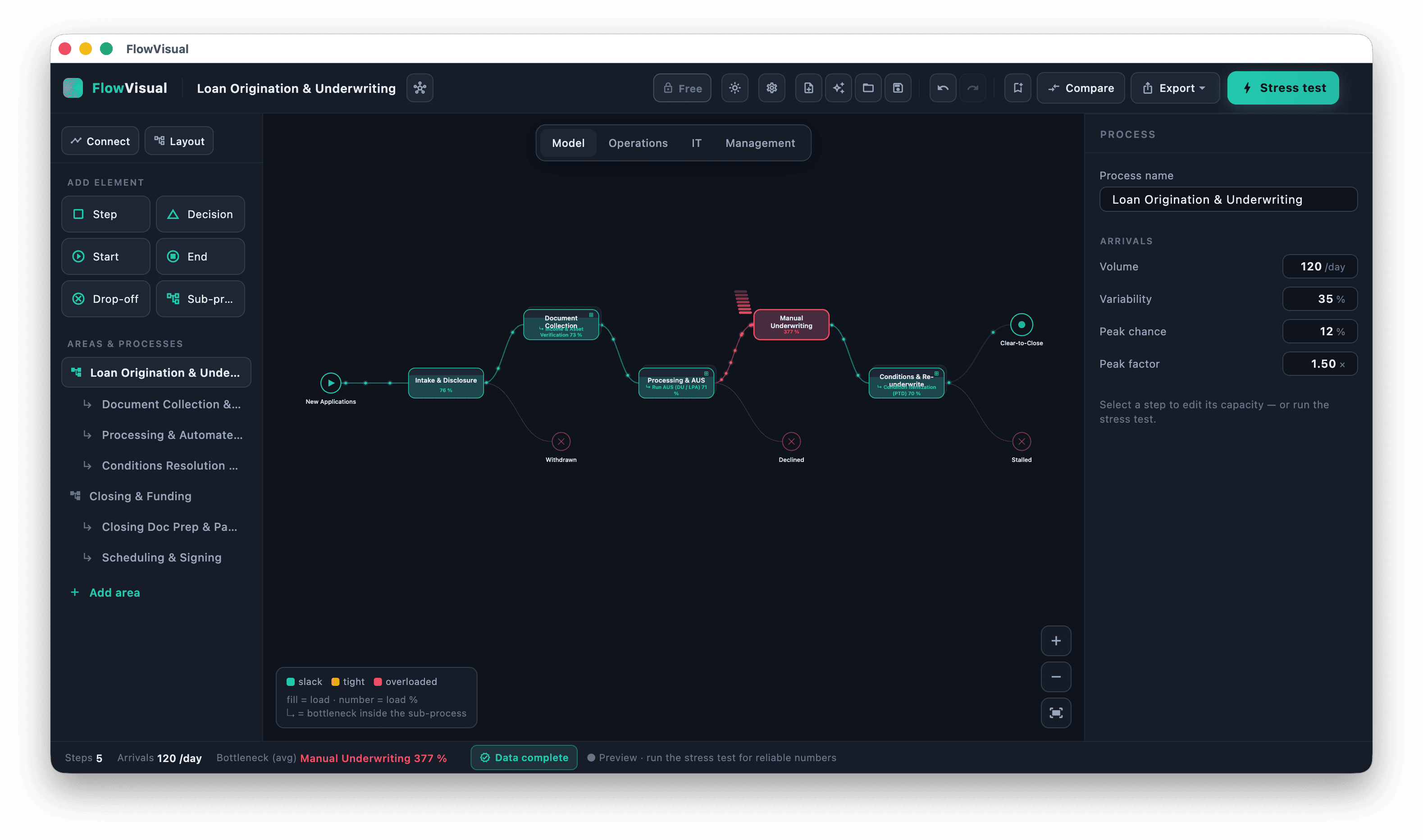
From a process on paper to a number you can defend
Four views, one result: you see where it jams — and what the fix is worth in euros.
Model the process instead of describing it
- Steps, decisions, start/end and sub-processes in a click
- Areas and processes cleanly structured in the sidebar
- Live preview with real-time bottleneck highlighting
Click your flow together from steps, decisions, drop-offs and sub-processes. Areas and processes live in the sidebar, and the live preview flags the bottleneck instantly — no BPMN degree required.
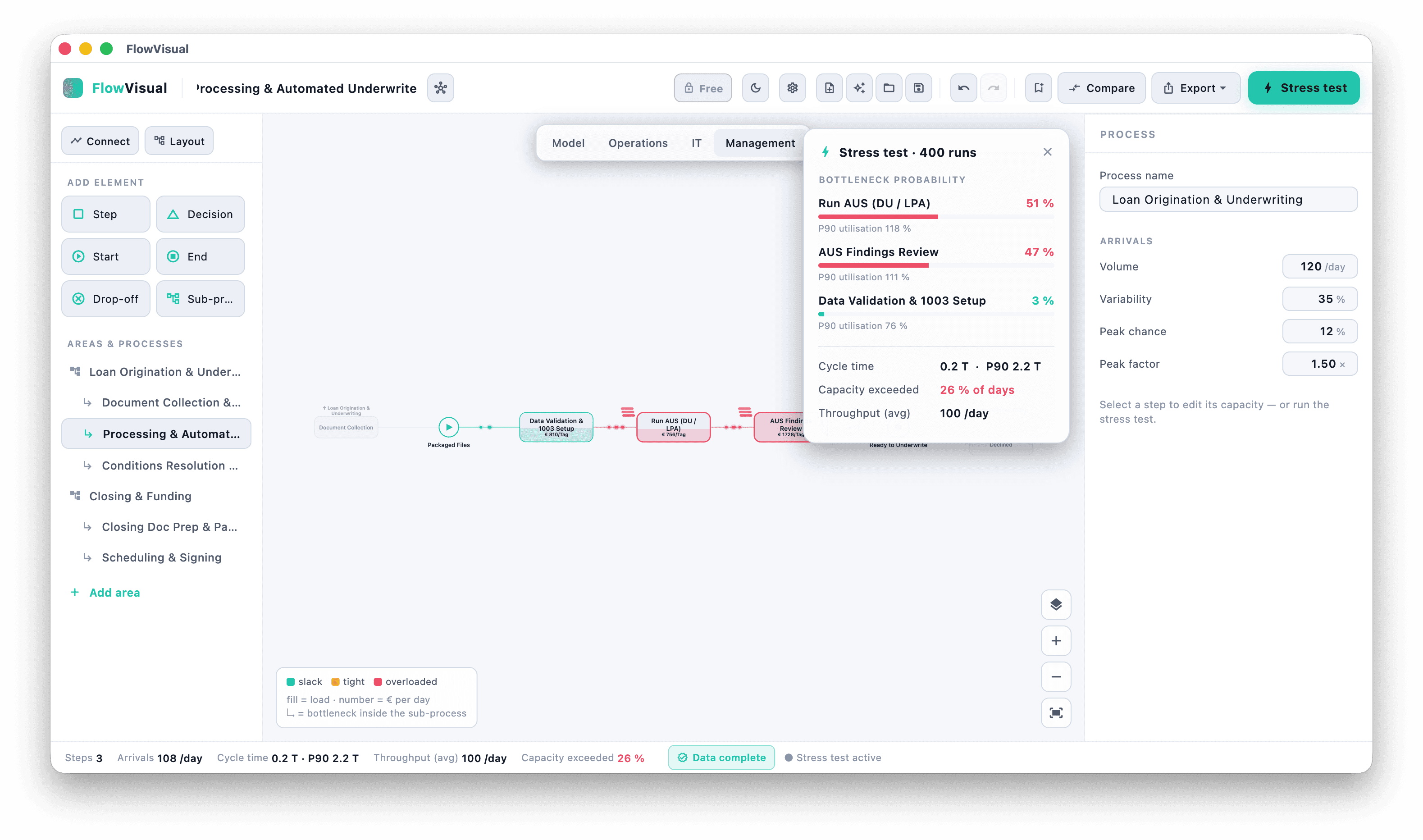
Stress test instead of a guess
- Bottleneck probability across hundreds of runs
- Cycle time as a P10–P90 range instead of false precision
- Throughput and days over capacity at a glance
A Monte-Carlo run across hundreds of passes shows which step most likely becomes the bottleneck — with cycle time as a P10–P90 range, throughput, and the share of days that exceed capacity.
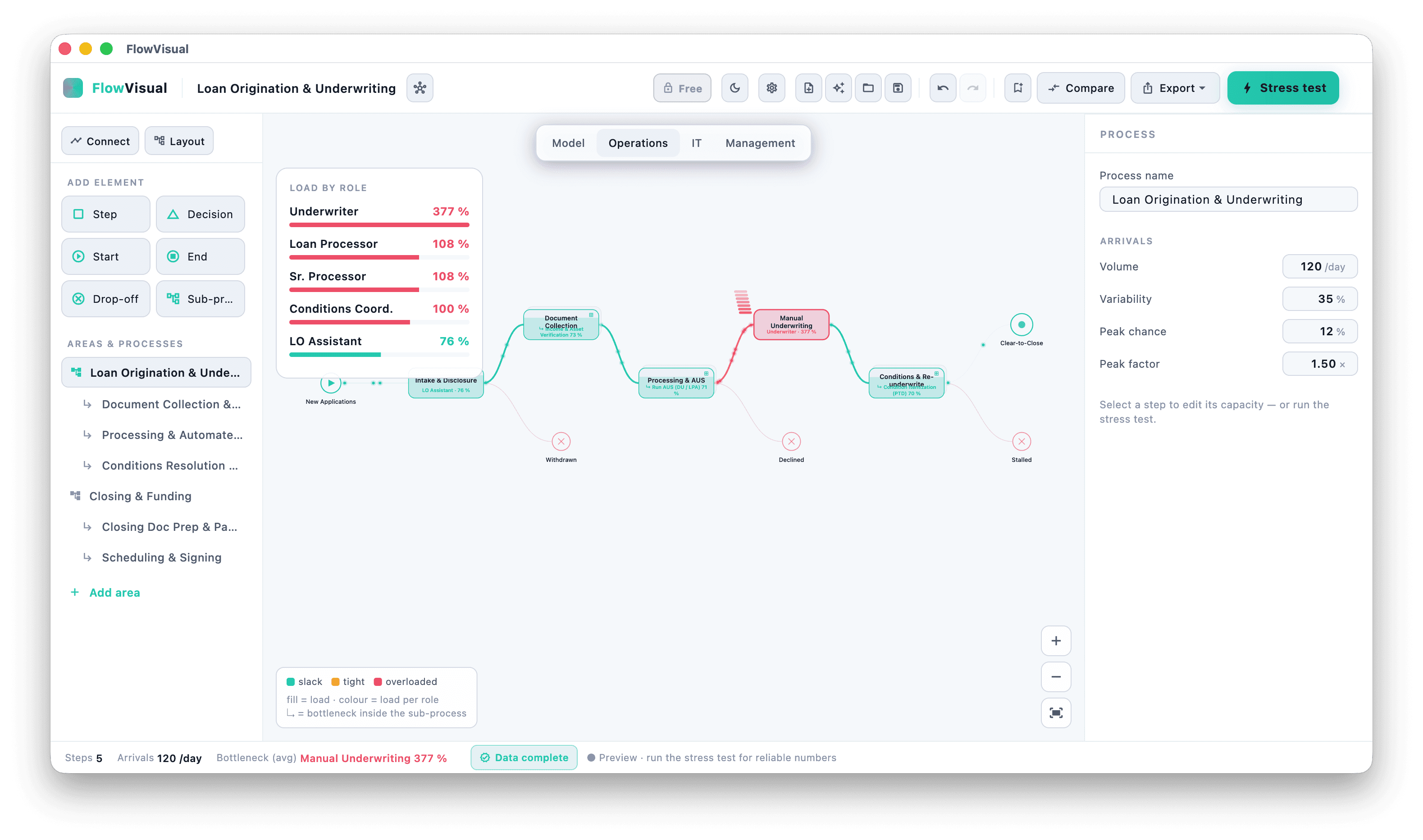
Make load per role visible
- Utilization per role in percent, colour-coded
- Overloaded roles spotted instantly
- Evidence for re-distribution instead of gut feeling
Who is overloaded, who has slack? The operations view shows utilization per role in percent — the basis for re-distributing work before you start thinking about new hires or new software.
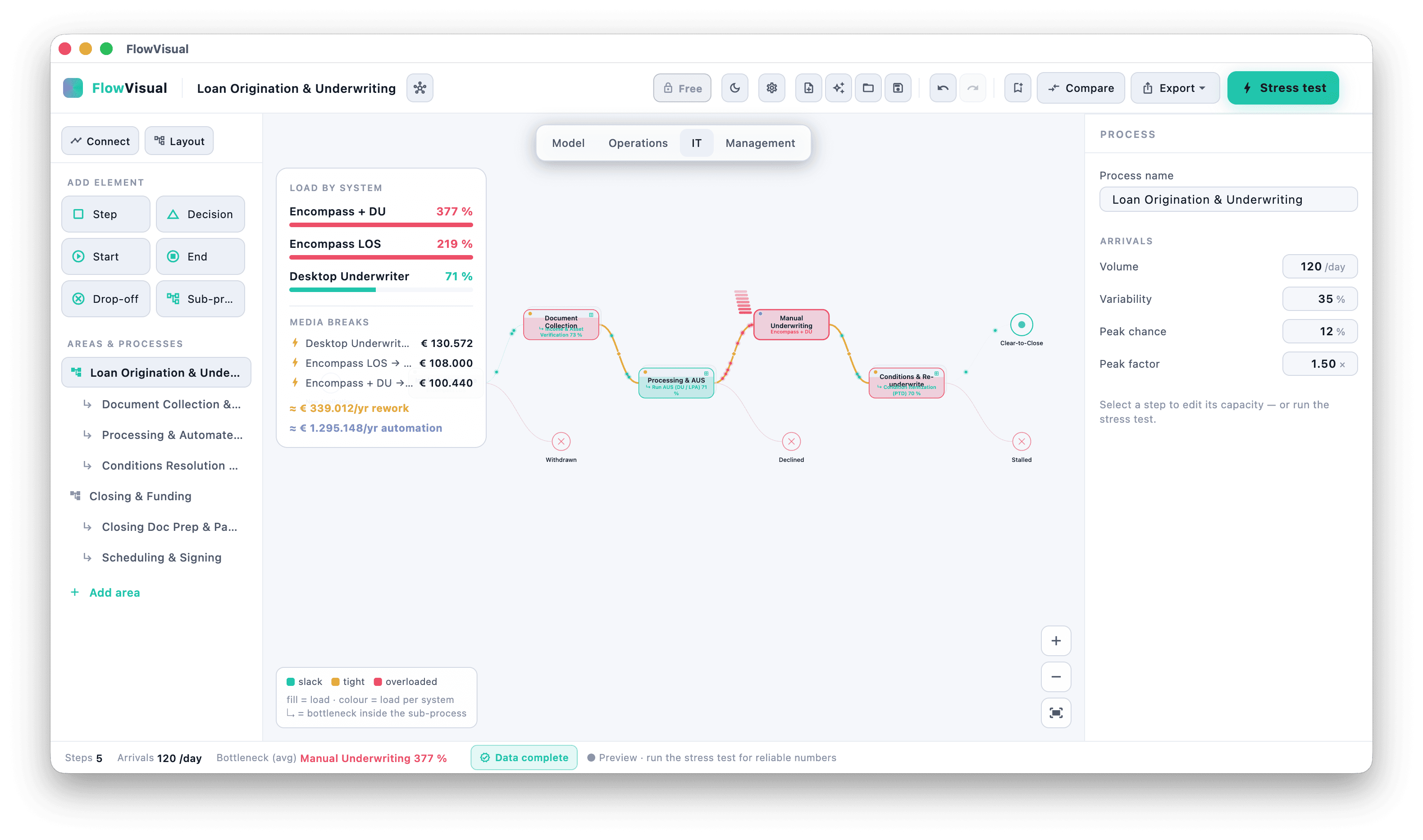
Media breaks and automation potential in euros
- Load per system, not just per person
- Media breaks made visible — where data gets re-typed
- Rework and automation potential in euros per year
The IT view shows load per system, exposes media breaks, and quantifies rework and automation potential in euros per year. So you know which step is actually worth digitizing — before you start.
A process is not a sum.
Try it yourself: same process, four situations — a demand spike, a supply shortage, staff out sick. Watch the bottleneck move, and watch whether a person or a system is the limit. That decision is the whole point.
Your bottleneck is not a property of the process. It is a property of the situation.
The same five steps, four situations. One run draws one duration per step — one possible day. Five hundred runs make a distribution. Switch the situation and watch the bottleneck move.
An ordinary month. Nothing unusual happens — which is exactly what every process is designed for.
- Auftrag erfassen—
- Technische Prüfung—
- Material / Lieferant—
- Freigabe—
- Versand—
3 h 03 min
The figure everyone calculates.
—
—
This gap is where deadlines break.
- Auftrag erfassen0 %
- Technische Prüfung0 %
- Material / Lieferant0 %
- Freigabe0 %
- Versand0 %
What comes out the other end
Every analysis in our archive was produced with this instrument. Same model, same Monte Carlo run, same evaluation — the only difference is that those are our processes, and the next one is yours.
- AN-2026-03
The analysis where we would have advised doing nothing
A distributor wanted to automate complaint handling. The measurement shows the money would have been burnt: the bottleneck sits outside the company.
Read - AN-2026-02
The invoice sitting in the site manager's car
A construction firm loses early-payment discounts — not for lack of cash, but because approval travels the country on paper.
Read - AN-2026-01
The quotation process that stalls in engineering
A supplier loses four days in its quotation process — not in costing, but in the queries forced by an incomplete request.
Read
Built for honest numbers
No false precision, no cloud requirement — a tool for decisions that hold up.
Ranges, not false precision
Every euro figure comes with a P10–P90 band. 5–10 minutes instead of a made-up 7.5 — the way processes actually run.
Runs locally, no sign-up
No cloud, no account. Your files stay on your own drive — ideal for sensitive process data.
Branded PDF
Export the before-and-after as a branded PDF — for your proposal, your business case or the steering committee.
Mac & Windows
Native desktop app for macOS (Apple Silicon & Intel) and Windows 10/11. Fast, offline, no browser lag.
Download FlowVisual 1.0
Version 1.0. Free for 14 days — no risk, no cloud.
Version 1.0 · macOS (Apple Silicon & Intel) · Windows 10/11
Frequently asked questions about FlowVisual
No. FlowVisual runs entirely locally on your machine. There is no sign-up and no server — your process files stay on your own drive.
No, deliberately not. FlowVisual is intentionally simpler: you click the process together from building blocks in minutes instead of learning a notation. It's about measuring, not documenting.
You enter volumes, variability and capacities. The Monte-Carlo stress test turns them into ranges (P10–P90) instead of false precision — probabilities rather than a single wishful number.
FlowVisual is in Version 1.0 (version 1.0) and free to try for 14 days. After that it runs as an early-access subscription for teams (B2B, net). You can download and try it right away.
Rather do it together? We'll model your most expensive process with you.
Don't want to click it yourself? In 20 minutes we'll capture your most important process and show you the bottleneck in euros — with FlowVisual, live.
No sales pitch. No slides. Just straight talk.